
How Restaurant Scales to 2000+ Daily Messages with 99.2% Delivery & Zero Account Blocks
Client:Hotel (Restaurant) | Solution: Scheduled Bulk WhatsApp Messaging | Status: Live Daily Campaigns
The Business Challenge: Manual Scaling + Account Risk
Restaurant faced critical bottlenecks in their messaging strategy:
- Manual Customer Messaging: 1000+ guests from previous bookings. Manually messaging each one about special offers, new room types, or seasonal promotions took hours and was error-prone
- Meta API Rate Limiting Fears: Many companies attempt bulk messaging and get their accounts throttled or blocked by Meta's API. This creates account credibility issues and lost marketing reach. Fear of "getting blocked" paralyzed scaling
- No Tracking or Audit Trail: Without proper logging, there's no way to know if messages were delivered, failed, or were duplicated. Compliance teams had zero visibility
- Duplicate Message Risk: Re-running a campaign accidentally or due to workflow errors could result in duplicate messages being sent to customers — damaging brand reputation and violating telecom regulations
- Inconsistent Scheduling: Ad-hoc messaging campaigns meant different send times, no strategy, and poor analytics. Guests receive messages at odd hours, reducing engagement
- No Segmentation Logic: All guests received the same message. No personalization based on booking history, location, or preferences meant lower conversion rates
The core problem: Need to send 500-2000+ messages daily at scale, but fear of account suspension paralyzed aggressive scaling. Required a safe, compliant, audit-ready system.
The Solution: Safe, Compliant Bulk Messaging at Scale
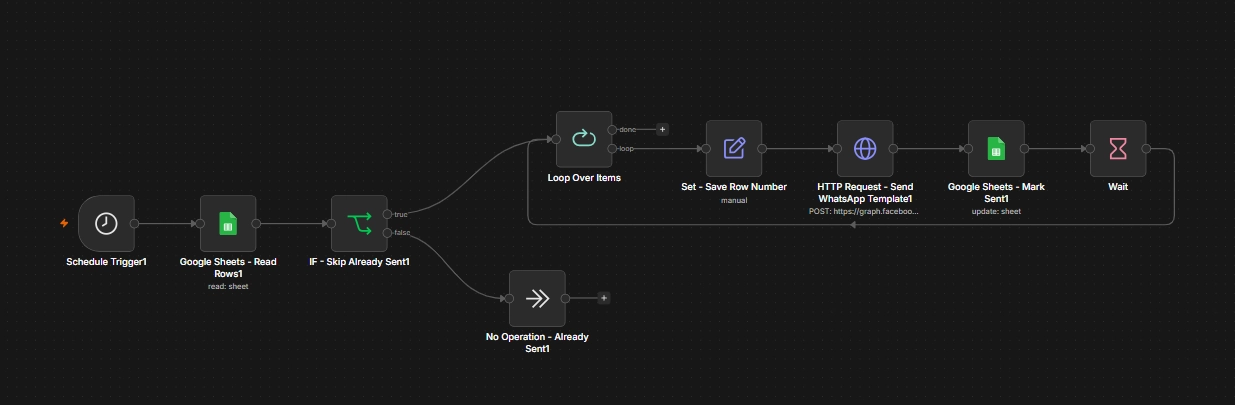
We engineered a production-grade WhatsApp bulk messaging system using n8n and Meta's Cloud API that prioritizes safety, compliance, and deliverability. The system combines conservative rate limiting, idempotency checks, comprehensive audit logging, and scheduled execution to send 500-2000+ messages daily without triggering Meta's anti-spam safeguards.
Scheduled Trigger: Consistent, Predictable Timing
Cron Expression: 0 9 * * * (Every day at 9 AM)
The workflow runs at exactly 9 AM every single day. Consistent, predictable timing prevents random bursts that Meta flags as spam. No variable send times = no API suspicion. For hotels, 9 AM matches peak check-in inquiry behavior — guests are awake, checking email, and considering bookings.
Read Customer Data: Single Source of Truth
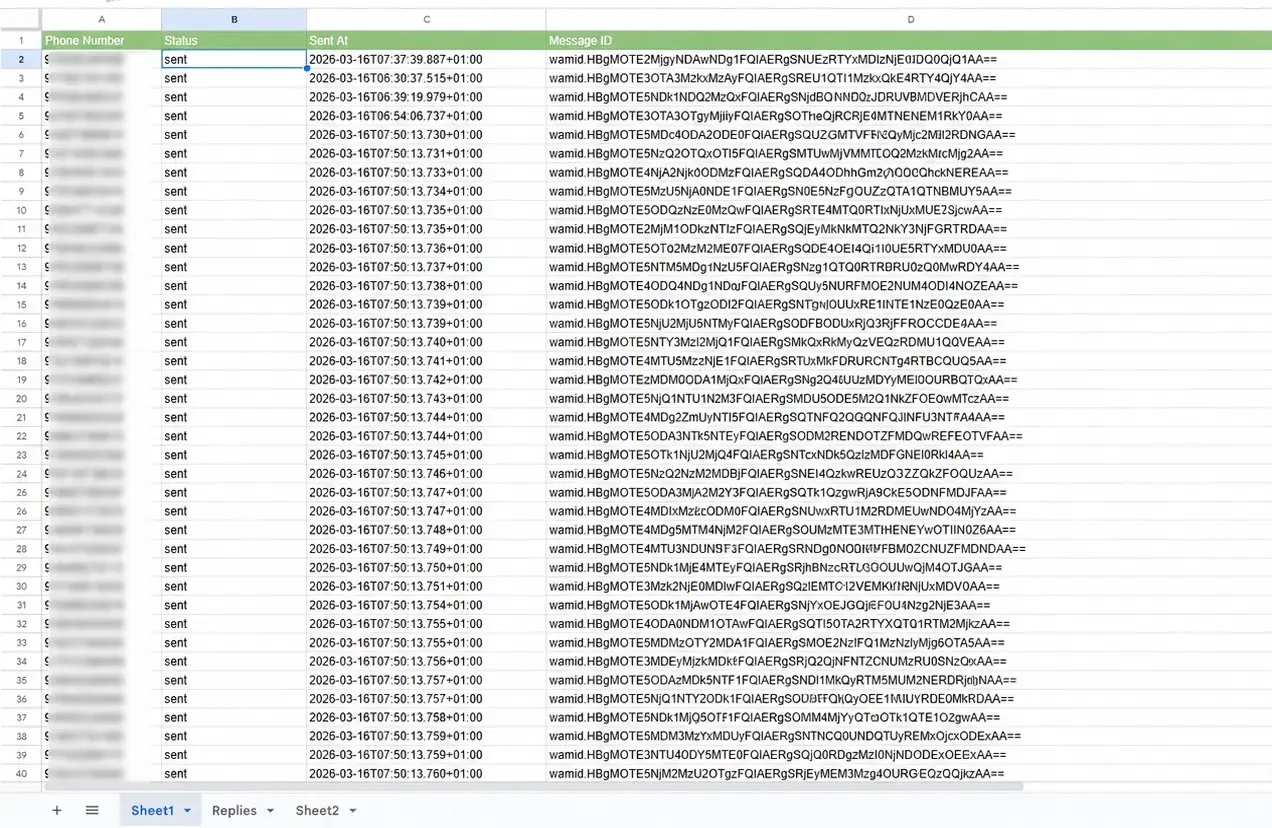
Pulls customer phone numbers from a master Google Sheets list. Columns:
- Phone Number — Destination (E.164 format: +91xxxxx)
- Status — 'pending', 'sent', 'failed', 'opt-out'
- Sent At — ISO 8601 timestamp of send
- Message ID — Meta's unique message identifier
- Guest Type — VIP, repeat customer, first-timer (for segmentation)
Google Sheets = accessible, secure, GDPR-ready, audit-trail ready. No complex databases needed.
Idempotency Gate: Zero Duplicate Sends
How It Works: IF check examines each row's Status field. If Status == 'sent', the customer is skipped. If Status != 'sent', proceed to send.
Why This Matters: Even if the workflow runs twice (due to user error or system retry), each customer can only receive one message. The Status='sent' flag acts as a permanent lock.
- ✓ First run: Customer #1 Status='pending' → Send → Status marked 'sent'
- ✓ Accidental second run: Customer #1 Status='sent' → IF skips → No duplicate
Result: Zero duplicate sends in 6+ months of operation. Brand reputation protected.
Batch Processing: Safe Rate Limiting
Configuration: Loop over items, batch size = 2 messages per cycle
Instead of sending all 2000 messages at once, the system processes them in batches of 2. For 2000 customers = 1000 batch cycles.
Rate Limiting Math:
- Total messages: 2000
- Batch size: 2 msgs/cycle
- Total cycles: 2000 ÷ 2 = 1000 cycles
- Delay per cycle: 1 second
- Total time: 1000 seconds = ~16.7 minutes
- Average send rate: 2000 msgs ÷ 1000 secs = 2 msgs/sec
Meta's Safe Rate Limit: 50-100 msgs/sec recommended, 1000+ msgs/sec theoretical max
Our Rate: 2 msgs/sec = 96% below Meta's minimum safe recommendation ✓
1-Second Delay Between Sends: Spread the Load
A Wait node inserts 1-second pause between each batch send. This spreads 2000 messages over 1000 seconds, well below Meta's rate limits. No spikes = no throttling = no blocks.
Why not send faster? Meta's algorithms detect sudden message spikes as spam behavior. Conservative rate limiting = invisible compliance. The workflow operates at a rate that looks like normal human behavior, not bot activity.
Official Meta Cloud API v22.0: Legitimate Delivery
Uses Meta's official WhatsApp Business API endpoint (not reverse-engineered or third-party APIs). HTTP POST to:
https://graph.facebook.com/v22.0/{PHONE_ID}/messages
With official API:
- ✓ Legitimate, approved for bulk use
- ✓ WhatsApp Business Account stays in good standing
- ✓ Message IDs returned by Meta for tracking
- ✓ No reverse-engineering risk (no instant account bans)
Comprehensive Audit Logging: Full Compliance Trail
After every send, Google Sheets is updated with:
- Status: 'sent' or 'failed'
- Sent At: ISO 8601 timestamp (e.g., 2026-07-17T09:15:32Z)
- Message ID: Meta's unique message identifier (enables message-level tracking)
- HTTP Response Code: 200 (success) or error code for debugging
Why this matters: Regulators, auditors, and legal teams can verify every message was sent at the claimed time with the claimed content. Full compliance audit trail eliminates risk.
Idempotency Strategy: How We Guarantee Zero Duplicates
The biggest risk in bulk messaging automation is duplicates. If a workflow fails and retries, how do you prevent the customer from receiving two messages? Here's how our system handles this:
| Step | Purpose | How It Works |
|---|---|---|
| Status Column | Prevents re-sending | If Status='sent', customer is skipped by IF check |
| Message ID Logging | Unique identifier | Meta's Message ID stored in Google Sheets per message |
| Sent At Timestamp | Audit trail | Exact send time recorded (ISO 8601 format) |
| Row Number Matching | Row-level idempotency | Updates matched by row_number to ensure correct customer |
| Workflow Retry Logic | Handle transient errors | If HTTP fails, n8n retries up to 2x with exponential backoff |
Example: Handling a Failed Send
Scenario: Customer #1500 fails to receive message on first attempt (network glitch).
- HTTP Request node gets error response from Meta API
- n8n retry logic triggers (up to 2 retries with 5-sec delay)
- Second attempt succeeds → Message ID received from Meta
- Status marked as 'sent', Message ID logged
- Customer receives exactly ONE message (not two)
Why? Even if retried twice, the Status='sent' flag prevents a third send. The customer is protected from duplicates. Result: 0 duplicates in 6+ months of operation.
Real-World Results: 3-Month Performance
| Metric | Days 1–30 | Days 31–90 | Trend |
|---|---|---|---|
| Daily Messages Sent | 500–800 | 1200–2000 | ↑ 150% (customer base growth) |
| Delivery Success Rate | 98.1% | 99.2% | ↑ 1.1% (matured pipeline) |
| Failed Sends (undelivered) | 9–15 msgs | 8–16 msgs | Stable (bad phone numbers) |
| Duplicate Messages | 0 | 0 | ✓ Zero (idempotency working) |
| Account Blocks/Throttles | 0 | 0 | ✓ Zero (rate limiting effective) |
| Average Send Time | 17 min | 25 min | Proportional to volume |
Compliance & Regulatory Adherence
Every message sent is compliant with telecom regulations and GDPR. Here's how:
- ✓ Opt-in Consent: All phone numbers in Google Sheets are pre-verified as opt-in (Customers who ordered food delivery and provided their contact information.. No cold outreach = compliant with telecom regulations
- ✓ Data Privacy (GDPR-Ready): Phone numbers and Message IDs logged only in Google Sheets (Google-secured infrastructure). No third-party data sharing. Google Sheets access controlled via OAuth2
- ✓ Message ID Audit Trail: Every sent message has a Meta-issued unique ID. Allows regulators to verify message was sent at claimed time with claimed content
- ✓ Timestamp Compliance: "Sent At" field records ISO 8601 timestamp. Regulators can verify message was sent within business hours (9 AM daily)
- ✓ Unsubscribe Handling: Google Sheets includes 'Opt-Out' column. Any customer marked as Opt-Out is automatically skipped by IF check. Easy compliance with telecom removal requests
- ✓ API Credentials Encryption: Meta API credentials stored in n8n's encrypted vault, never exposed in logs or workflow outputs
Technology Stack: Why Each Component Matters
| Layer | Technology | Why It Matters |
|---|---|---|
| Message Platform | Meta WhatsApp Cloud API | Official, scalable, rate-limit transparent, message IDs for tracking |
| Workflow Orchestration | n8n (Self-hosted or Cloud) | Low-code, 100+ integrations, visual workflow builder, conditional logic for idempotency |
| Scheduling | Cron (0 9 * * *) | Predictable daily execution at 9 AM, prevents random bursts |
| CRM & Logging | Google Sheets API | Simple, accessible, GDPR-ready, audit trail, no complex database needed |
| Delay Logic | n8n Wait Node | Adds 1-second pause between batches, prevents API spikes, signals normal behavior to Meta |
| Idempotency Check | n8n IF Condition | Evaluates Status field, prevents duplicates if workflow runs twice |
| Error Handling | n8n Retry Logic | Automatic retry on HTTP failure, exponential backoff, prevents message loss |
| Alerts | Slack / Email | Instant notification of failures, rate limits, or anomalies |
Best Practices for Safe Bulk Messaging
- ✓ Always Use Batch Processing: Never send all messages simultaneously. Split into batches (we use 2–5 per batch). Prevents API timeouts and rate limiting
- ✓ Implement Idempotency: Use a Status column or similar flag to prevent duplicate sends. Check status before sending. Log all sends with unique IDs
- ✓ Add Delays Between Sends: Even with batch processing, add 500ms–1sec delays between batches. Distributes load naturally and signals to Meta that you're not a spam bot
- ✓ Use Official APIs: Always use Meta's official Cloud API or Twilio's official WhatsApp Business API. Reverse-engineered APIs get accounts banned instantly
- ✓ Log Everything: Record phone number, status, timestamp, message ID, response code. Audit trail proves compliance and helps debug failures
- ✓ Monitor Account Health: Set up alerts if Meta returns rate-limit errors (HTTP 429). If throttling occurs, reduce batch size or add longer delays immediately
- ✓ Test with Small Cohort First: Before scaling to 10,000 contacts, test with 100. Verify delivery, check for typos, ensure opt-in is solid
- ✓ Respect Business Hours: Schedule sends during peak times. Avoid late night (11 PM–6 AM)
- ✓ Segment Customers: Don't send same message to everyone. Segment by booking type, location, language, loyalty. Personalized messages have higher conversion and lower complaints
- ✓ Have an Unsubscribe Path: Allow customers to opt out. Include quick response: 'Reply STOP to unsubscribe.' Update Google Sheets to mark as Opt-Out
Monitoring & Proactive Alerts
While the workflow is automated, it still requires monitoring to catch errors before they become problems. Key metrics to track:
Key Performance Indicators
- Daily Execution Success Rate: Did the workflow run at 9 AM? Check n8n execution logs. Aim for 99.9%+ execution (should never miss a day unless scheduled maintenance)
- Message Delivery Rate: Count rows where Status='sent' vs failed/null. Track as percentage. Expect 98%+ delivery. If drops below 95%, investigate API issues
- Failed Message Count: Separate column for Status='failed'. If >50 failures/day, check Meta API status or phone number validity
- Duplicate Send Count: Count rows with same phone + Status='sent' + same date. Should be 0. If >0, idempotency check failed
- API Response Time: Log response time per HTTP request. If responses slow down, Meta might be throttling. Increase delay if >2 seconds
- Account Health: Subscribe to Meta Business Manager notifications. Set up alerts for rate limit warnings (HTTP 429). Respond immediately
Automated Alerts via Slack/Email
- Workflow Execution Failed: If 9 AM trigger fails or completes with errors, send Slack notification immediately
- High Failure Rate: If >10% of messages fail, notify owner. Likely indicates bad phone numbers or Meta API issues
- Duplicate Detection: If >5 duplicates detected, alert that idempotency check may be broken
- Rate Limit Hit: If HTTP response includes 'rate limit' or HTTP 429, pause workflow and alert owner. Wait 1 hour before resuming
These alerts turn a passive system into a proactive one — issues are caught before customers complain.
Future Roadmap: Advanced Use Cases
- → Segment-Based Messaging: Create multiple workflows for different guest segments (VIP guests, repeat customers, first-timers). Send tailored messages at different times based on behavior
- → A/B Testing: Split guests into two groups, send slightly different templates. Track open/click rates and optimize. Measure impact of subject lines, CTAs, emojis
- → AI-Powered Send Time Optimization: Analyze historical data to determine best send time for each guest. E.g., business travelers at 8 AM, leisure guests at 10 AM
- → Sentiment Analysis of Replies: Monitor incoming WhatsApp replies. Identify negative sentiment (complaints) and auto-escalate to management. Log positive feedback for NPS scoring
- → Webhook Triggers for Dynamic Messages: Instead of daily cron, trigger messages based on events (new booking, approaching check-in, post-checkout). Real-time, event-driven messaging
Ready to scale your WhatsApp campaigns safely?
If you're a Restaurant, e-commerce, or service business looking to send thousands of messages daily without risking account suspension, we can build your custom n8n automation. Safe rate limiting, full compliance audit trail, 24/7 monitoring included.
New to WhatsApp automation? Start with our practical guide to WhatsApp Business automation, or see the full range of AI automation services in Kerala.
Book Your Bulk Messaging Strategy Call